






.webp?width=1080&height=1080&name=benefits%20(1).webp)












.webp?width=300&height=300&name=Auto%20Dealerships%20(1).webp)






.webp?width=130&height=130&name=accountant%20icon%20(1).webp)


.webp?width=300&height=300&name=Website%20Image%20(8).webp)
.png?width=1080&height=1080&name=support%20(2).png)









Welcome to Paper Trails - Let's Get You Set Up
Everything you need in your first few weeks — deadlines, logins, training, and who to call. Bookmark this page; it's your home base
ON THIS PAGE
Submit payroll by
—
Funds debited
—
Employees paid
—
Cash flow tight this cycle?
Payro gives eligible businesses short-term payroll funding — same-day access, no credit impact to apply. Worth setting up before you need it.
Fastest
Help Yourself
- Login and MFA help at papertrails.com/help
- Step-by-step guides and short videos
- Hundreds of blog articles
- Printable help cards for your team
Best For Anything Specific
Your Dedicated Account Rep
- Knows your setup, your people, your quirks
- Payroll changes, corrections, off-cycles
- One-on-one training on any topic
- Custom reports, imports, and integrations
General Support
Our Team
- Phone: 207.721.8575
- Email: payroll@papertrails.com
- Support form at papertrails.com/contact
- Or stop in to our Kennebunk office anytime!
Start with these
Or watch our short videos
Tutorials we recorded ourselves, covering the things clients ask about most.
Learn & stay informed
The Blog
Learn & stay informed
Monthly Webinars
Learn & stay informed
isolved University
Learn & stay informed
Guides & Checklists
Free for your team
People Cloud App
Free for your team
ZayZoon
Free for your team
FinFit
Free for your team
Employee Marketplace
Free for your team
Voluntary Benefits
Free for your team
rapid! PayCard
Free for your team
TurboTax Import
Free for your team
The Work Number
Workforce tools
Time & Attendance
Workforce tools
Hiring & Onboarding
Workforce tools
Benefits Administration
Workforce tools
Learning Management
Workforce tools
Expense Management
Workforce tools
Performance Management
HR & advisory
HR Consulting
HR & advisory
Labor Law Posters
HR & advisory
Work Opportunity Tax Credit
HR & advisory
FSA, HSA, HRA & COBRA
HR & advisory
Always-On HR
Integrations
Payro
Integrations
QuickBooks Online & GL
Integrations
Retirement & MERIT
Integrations
Workers' Comp Pay-As-You-Go
Integrations
Employee Navigator
Integrations
Accountant Access
Integrations
Custom Integrations & APIs
Integrations
Profit by Paymentus
Protection
E-Verify
Protection
Background Screening
Protection
Acrisure Cyber Services Plus
Protection
Trust & Security
Employee Welcome Kit
We put together a guide your employees can keep — how to activate their account, log in, set up multi-factor authentication, and use the wellness tools they have access to. Download it and send it out or hand it out at your next team meeting.
isolved People Cloud Mobile App
Everything your employees need lives in one place — the isolved People Cloud app. From their phone, they can:
- View paystubs and W-2s
- Update direct deposit and tax withholdings
- Request time off and clock in and out
- Enroll in benefits during open enrollment
- Access wellness tools like ZayZoon and the Employee Marketplace
It's free in the App Store and Google Play, or they can use myhrstuff.com from a computer. Their username is always their email address.


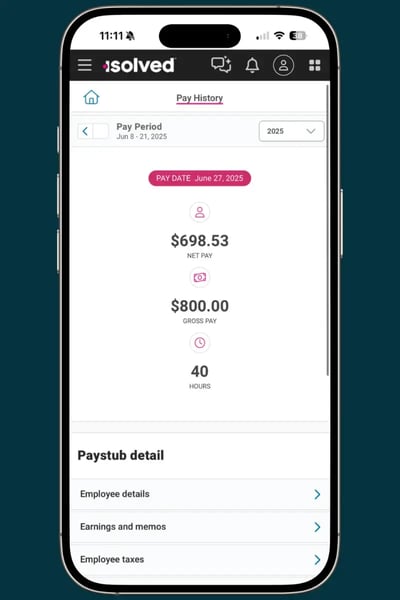
Share this help card with your employees
Activating an account
Activating an account
New employees are set up automatically and get an activation email from PaperTrails@myisolved.com.
- Click the activation link in the email.
- Enter the authorization code — the last four digits of their Social Security number.
- Set a 12-character password and security questions, then save them somewhere safe.
- Add a passkey (Face ID, fingerprint, or PIN) as the sign-in method.
Only the employer can resend an activation email — Paper Trails can't send it directly.
Where to log in
Where to log in
Two options, same account. The username is always their email address.
- isolved People Cloud app — free in the Apple and Google Play stores.
- myhrstuff.com — from any computer.
If asked to choose a "Tenant of isolved," pick PTRLS. That's the Paper Trails version.
Forgot a password? Neither you nor we can reset it. Use "I Forgot My Password" on the login screen and follow the wizard.
Need Help?
Multi-Factor Authentication (MFA)
These are already available to your team at no cost to you. Point them to the People Cloud app and they'll find them under Third-party Apps.
Recommended
Passkey
Strong
Authenticator app
Basic
SMS text codes
Not getting SMS text codes? It isn't just isolved.
Free Perks for Your Employees
These are available to your team at no cost to you. These can be accessed through the isolved People Cloud mobile app or by visiting myhrstuff.com or are already automatically running behind the scenes.
Earned Wage Access
Zayzoon
Discounts and Savings
Employee Marketplace
Financial Wellness
FinFit
Benefit Access
Voluntary benefits
Automatic
TurboTax Import
Automatic
The Work Number
Getting Started
-
Your implementation manager sets up your account during onboarding and you'll receive an activation email from PaperTrails@myisolved.com. Click the link, set a 12-character password, and add a passkey. If it hasn't arrived, check spam and then contact your processor.
-
Automatically. When an employee is added, isolved sends them an activation email. Their authorization code is the last four digits of their Social Security number. You can resend the activation from isolved at any time — Paper Trails can't send it on your behalf.
-
Two isolved University classes — How to Navigate isolved and Payroll Processing — take about 25 minutes together and save hours later. Then put your payroll deadlines on your calendar.
-
Your dedicated processor was introduced during onboarding and is your first call for anything payroll-specific. If you're not sure who that is, call the main line at 207-721-8575 or email payroll@papertrails.com and we'll connect you.
Deadlines & Processing
-
By noon ET, three business days before your pay date. For a Friday pay day, that's noon on Tuesday. Bank holidays shift this — we will confirm any week that's affected.
-
Payroll may have to move to the next business day, which pushes your debit and pay dates back too. Call your processor as soon as you know — sometimes there are options.
-
One business day before pay day, for the full amount including wages and taxes. For a Friday pay date, that's Thursday morning. Make sure funds are available to avoid bounce fees and employee direct deposit issues.
-
Call your processor before you submit. We also partner with Payro for short-term payroll funding — same-day access once approved, and applying doesn't affect your credit.
-
Yes. Contact your processor to schedule it and confirm timing and any additional fees.
Getting Help
-
We are open Monday through Friday 8:30am to 4pm. You can visit papertrails.com anytime and chat with our online chatbot or fill out our contact form, where we will usually be in touch within one businss day.
-
Call 207.721.8575, email payroll@papertrails.com, or use papertrails.com/contact. For anything specific to your account, your processor is the fastest route.
-
Send them to papertrails.com/help first; most issues are covered there with videos. Neither you nor Paper Trails can reset an employee's password — they have to use "I Forgot My Password" on the login screen.
To reset their self-service account or to change their email, watch this video here. -
Carriers have been filtering business texts much more aggressively since 2025, and this affects every company sending SMS. First have the employee check their Spam messages on their mobile device - it usually ends up there. Another fix is switching to a passkey or authenticator app, which don't depend on the carrier at all. Instructions are at papertrails.com/help.
-
No. For privacy and fraud protection we can't send paystubs, W-2s, or make direct deposit changes over email. Those go through the isolved People Cloud mobile app or through you as the employer.
-
Contact your processor. They'll scope what you need, confirm pricing, and help get your connected to the right team for setup. Most additions can be turned on within a few pay cycles.
-
Yes. Our HR consulting services come as an ongaing subscription or a one-time project — handbooks, audits, I-9 reviews, and hands-on guidance from a local expert.
Stay in the Loop
We'll Keep You Ahead of it All
Explore All of Our Payroll & HR Services
Can’t find what you’re looking for? Contact our local team.
We’ll stay in the weeds to manage your payroll, Human Resources, and compliance needs.